The game has gotten off to a rough start. None of this is the team's fault, this squarely falls on me and my troubles these past few weeks. Programming wise, what has been done in the game hasn't been too difficult. Marquee selection ended up being incredibly simple after I did all the necessary research and at that point selecting single units was a few extra lines of code. Swapping between scenes worked without a hitch. Much of the time spent wasn't even in the code, it was tweaking the camera speed and angle to best suit each scene and its controls.
Now, in to the issues the problems that have gotten this game off to a rough start. First would be communication. In week two this was a big issue because Andrew was unsure how to talk with me about what he should do on the project, and as such we lost any potential work he could have added programming wise. He did get all the documentation done though so not all was lost. We fixed this in week 3, starting with our first meeting where we outlined which pieces of the current project each person would work on, and during the week when we used our slack group to ask each other questions about the specific direction the game was going.
Second would be a mix of time management and life just getting in the way. Between work and classes, I have a fairly busy schedule week to week. As such, I try to set aside time to work on homework for class and on programming this game. Last week I was behind on both and with the class happening earlier in the week than the week two deadline, I put my attention on that first. All fine and dandy, except I was so tired from lack of sleep that I was unable to finish the work I had started on the game in time for the team's review. The next day I made sure everything was done and ready for our team meeting, but it was still technically late. This week was another monster all together. During the week my roommate seriously injured himself and needed to be taken to the Emergency Room. The time was 2 am. I did not sleep that night which was immediately followed by one of my most exhausting days at work yet. I fell asleep as soon as I got home and lost the entire day's worth of free time, time I had planned to use on the game.
Now, both these situations could have been mitigated is I set aside time earlier in the week. I need to work a lot on my time management in these coming weeks for not only this game but whichever we choose to go forward with. Right now it's not looking good for this one even though I personally feel it has a stronger and more manageable direction. By the end of next week though both games should be in the spot we want them and we will choose from there.
Wednesday, September 30, 2015

Wednesday, September 16, 2015
Let the Games Begin: Ideation and Iteration
A new year. A new team. A new game to create.
When said like that it all seems so simple, yet game development rarely is. For a ragtag team of three programmers, a designer, and a producer, we have a blessing and a curse. We lack a dedicated artist. This means we are free to create what we want gameplay wise, but on the flipside we won't have any art to back it up if the gameplay alone falls flat. However, we have enough programming power to create something fairly complex and special, so we headed into the ideation phase with high hopes.
That's the thing about ideas though, they are cheap and anyone can make one. Many of our ideas fell into this category. Two stood above the rest when all was said and done, a 2D Survival Game and a Guild Management Simulator. We had also considered a form of Tower Defense, but some of the ideas were adapted into a potential direction for the Survival Game. Art wise, these games could be rough, but we plan on sticking to a simpler, almost pixel art style to keep the art load low but still presentable.
The Survival Game is fairly simple on the outside, survive the dangers present in the world around you. The complexity comes in with our potential design directions. The dominant choice right now is to have a city system. The player could enter the cities and interact with the townsfolk, but ultimately have to head back into the wild after and indeterminate amount of time. The cities themselves would change overtime as well, with some cities completely disappearing off the map due to some natural disaster. We have also considered having base building that must be defending from roaming enemies. Possible settings include post-apocalyptic for something closer to Earth or a Rim World for a more science fiction feel.
The Guild Management Simulator is the idea I am the most attached to and have contributed the most to design wise. Set in a Fantasy or Medieval setting, you are the Guild Master ad you must recruit adventurers to help you complete jobs and clear out dungeons to keep the guild running. It's a two part game. On the management side you send adventurers out to autonomously complete jobs given to you by Non-Player Characters(NPCs), maintain and build up the guild, as well as recruit new members. You can decide what rooms you want in the guild to best maximize your members effectiveness and where they are located. There will be a main hall in which you can choose a specialization that will help the guild attract more members, make more money, or somewhere in-between. This room can be customized as well which might have an effect on how effective your specialization is. On the other side is the combat missions. These take place in the Dungeon, a multi-tiered structure found in the city that is infested with monsters. The combat system will be a variation on the standard Real Time Strategy (RTS) style gameplay. Defeating a combat mission earns great rewards than those normally received from sending your guild members on jobs. It also unlocks the next floor of the Dungeon and allows you to send parties of adventurers to clear the defeated floors. This game would benefit from both a 2D or 3D style, and the one that is chosen will greatly influence how we design the game later on if we chose to go forward with it.
We hope to have both prototypes done by this time next week so we can make our decision on which game to move forward with. And then the real fun begins.
When said like that it all seems so simple, yet game development rarely is. For a ragtag team of three programmers, a designer, and a producer, we have a blessing and a curse. We lack a dedicated artist. This means we are free to create what we want gameplay wise, but on the flipside we won't have any art to back it up if the gameplay alone falls flat. However, we have enough programming power to create something fairly complex and special, so we headed into the ideation phase with high hopes.
That's the thing about ideas though, they are cheap and anyone can make one. Many of our ideas fell into this category. Two stood above the rest when all was said and done, a 2D Survival Game and a Guild Management Simulator. We had also considered a form of Tower Defense, but some of the ideas were adapted into a potential direction for the Survival Game. Art wise, these games could be rough, but we plan on sticking to a simpler, almost pixel art style to keep the art load low but still presentable.
The Survival Game is fairly simple on the outside, survive the dangers present in the world around you. The complexity comes in with our potential design directions. The dominant choice right now is to have a city system. The player could enter the cities and interact with the townsfolk, but ultimately have to head back into the wild after and indeterminate amount of time. The cities themselves would change overtime as well, with some cities completely disappearing off the map due to some natural disaster. We have also considered having base building that must be defending from roaming enemies. Possible settings include post-apocalyptic for something closer to Earth or a Rim World for a more science fiction feel.
The Guild Management Simulator is the idea I am the most attached to and have contributed the most to design wise. Set in a Fantasy or Medieval setting, you are the Guild Master ad you must recruit adventurers to help you complete jobs and clear out dungeons to keep the guild running. It's a two part game. On the management side you send adventurers out to autonomously complete jobs given to you by Non-Player Characters(NPCs), maintain and build up the guild, as well as recruit new members. You can decide what rooms you want in the guild to best maximize your members effectiveness and where they are located. There will be a main hall in which you can choose a specialization that will help the guild attract more members, make more money, or somewhere in-between. This room can be customized as well which might have an effect on how effective your specialization is. On the other side is the combat missions. These take place in the Dungeon, a multi-tiered structure found in the city that is infested with monsters. The combat system will be a variation on the standard Real Time Strategy (RTS) style gameplay. Defeating a combat mission earns great rewards than those normally received from sending your guild members on jobs. It also unlocks the next floor of the Dungeon and allows you to send parties of adventurers to clear the defeated floors. This game would benefit from both a 2D or 3D style, and the one that is chosen will greatly influence how we design the game later on if we chose to go forward with it.
We hope to have both prototypes done by this time next week so we can make our decision on which game to move forward with. And then the real fun begins.
Wednesday, April 29, 2015
Programming for the Oculus Rift
Virtual Reality has always been a dream of mine since I started playing video games. Imagine not just playing a game but living it. I couldn't hope for anything better. In today's world, that dream is starting to become a reality. The Oculus Rift might not be true virtual reality, but it certainly is a step in the right direction. It is a virtual reality headset, immersing the player in their game world and giving them control over the rotation of their frame of view by turning their head. It's the first piece of the VR puzzle, and this past month I was given a chance to develop a small game demo for one.
Now first time setup for an Oculus Rift is not an easy process, like any other new peripheral. This was made more difficult due to the age of the graphics card I use in my desktop, but once that hurdle was passed the rest fell into place easily. Once the Oculus was connected and working with the desktop I tested it in a few compatible games and demos. This confirmed that the device was in fact working and gave me a better idea of what sort of game would work best with the Oculus.
The first proto-type was going to be a simple First Person Role Playing Game (RPG). The player was easy and setup fairly quickly, but when I tried to add vehicles everything started to go wrong. The Unity plugin for the Oculus Rift does not deal with multiple camera sources very well. Trying to rename the cameras so they were easy to find just ended up with those cameras being ignored and new ones being created under the default name. Linking the camera's directly to a public variable instead of trying to find them dynamically didn't work much better. Now at this point I could have just scrapped the vehicles and gone forward with the RPG, but they were and important part of my game's design. I had also been recently inspired by Elite: Dangerous to try a Space Simulator, so I decided to save all the usable code and changed up the prototype.
My second and final prototype is a simple Space Sim Demo. 6 Stars and one planet make up this small star system. The player can fly around all of them looking for 7 spaceships. these ships can be destroyed with your laser. It takes 5 shots to kill a ship and currently they just circle around their spawn point. I considered making both an aggressive and passive AI, but I didn't have time to tune the them so they were left out for now. The aggressive AI was too good at killing the player and the passive AI wasn't compelling to chase down.
In the end, I ended up with a nice little prototype that can easily be expanded to include more planets, more star types, and better AI. I also learned how to setup a game for use with the Oculus Rift, which was my main goal going into this. If I ever need to make a game for the Oculus again in the future I will be prepared to do so.
Now first time setup for an Oculus Rift is not an easy process, like any other new peripheral. This was made more difficult due to the age of the graphics card I use in my desktop, but once that hurdle was passed the rest fell into place easily. Once the Oculus was connected and working with the desktop I tested it in a few compatible games and demos. This confirmed that the device was in fact working and gave me a better idea of what sort of game would work best with the Oculus.
The first proto-type was going to be a simple First Person Role Playing Game (RPG). The player was easy and setup fairly quickly, but when I tried to add vehicles everything started to go wrong. The Unity plugin for the Oculus Rift does not deal with multiple camera sources very well. Trying to rename the cameras so they were easy to find just ended up with those cameras being ignored and new ones being created under the default name. Linking the camera's directly to a public variable instead of trying to find them dynamically didn't work much better. Now at this point I could have just scrapped the vehicles and gone forward with the RPG, but they were and important part of my game's design. I had also been recently inspired by Elite: Dangerous to try a Space Simulator, so I decided to save all the usable code and changed up the prototype.
My second and final prototype is a simple Space Sim Demo. 6 Stars and one planet make up this small star system. The player can fly around all of them looking for 7 spaceships. these ships can be destroyed with your laser. It takes 5 shots to kill a ship and currently they just circle around their spawn point. I considered making both an aggressive and passive AI, but I didn't have time to tune the them so they were left out for now. The aggressive AI was too good at killing the player and the passive AI wasn't compelling to chase down.
Revisiting Multi-threading
Last year I took on a project to add multi-threading to a pathfinding AI simulation. While moderately successful, the simulation ran into problems with the number of threads created when I increased the counter in the function controlling their creation. With the goal of improving this functionality in mind, I took it upon myself to fix it and have a much more robust multi-threaded system.
The reason for the crashes was because the program had run out of memory, but I had thought I had accounted for that case within the program. Turns out my implementation was wrong and stemmed for one simple misunderstanding of how the threads were working. When I created the threads I would detach them until the counter hit max, and then wait for that one to join before detaching more. This is where everything went wrong.
I was assuming each of the detached threads would finish before the one I was trying to join. This was not the case. Detaching anymore than one thread before joining the next caused them to pile up faster than the system was ending their processes, burning through the available memory. Such a simple solution that had avoided me at the time due to my poor understanding of exactly how joining and detaching threads worked.

With my new found understanding of detaching and joining threads I relocated the thread creation and set them up in a better management function. This one allowed all the necessary threads to be created without running out of memory. Now my program could create as many threads as necessary without crashing.
The reason for the crashes was because the program had run out of memory, but I had thought I had accounted for that case within the program. Turns out my implementation was wrong and stemmed for one simple misunderstanding of how the threads were working. When I created the threads I would detach them until the counter hit max, and then wait for that one to join before detaching more. This is where everything went wrong.
I was assuming each of the detached threads would finish before the one I was trying to join. This was not the case. Detaching anymore than one thread before joining the next caused them to pile up faster than the system was ending their processes, burning through the available memory. Such a simple solution that had avoided me at the time due to my poor understanding of exactly how joining and detaching threads worked.
With my new found understanding of detaching and joining threads I relocated the thread creation and set them up in a better management function. This one allowed all the necessary threads to be created without running out of memory. Now my program could create as many threads as necessary without crashing.
Thursday, September 11, 2014
UDP vs TCP
When making an online multiplayer game, how the networking is done between clients is an important decision. What should be sent between clients and how they interact with each other will define how your game works. How this information is sent between clients is also a big decision, which can effect how well your game plays online.

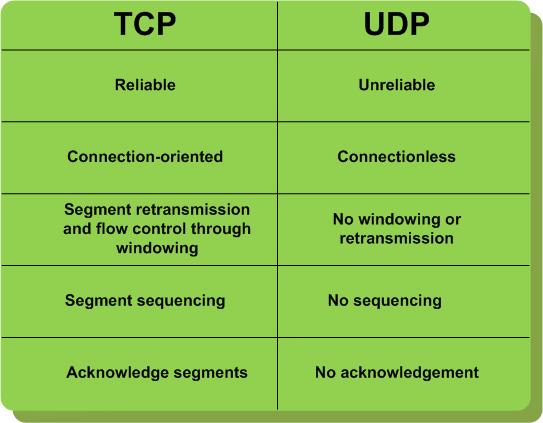
TCP and UDP are the two most common methods of packaging and transmitting the necessary data between clients, or a client and a server. TCP is much more reliable, It checks itself as is passes along the various routers and switches, and if a piece of data is lost, stuck behind, or out of order, it will wait until it is complete again. However, compared to UDP it is slower because of these checks. UDP doesn't have the checks, if something is lost or left behind, it doesn't care. All the data that reaches its destination is what you get, in the correct order or not. It's a fire and forget method.
 |
| it20.info |
For an online multiplayer, both speed and reliability are important, so which is better? Most games will actually use both. For example, League of Legends. League of Legends (LoL) is a Multiplayer Online Battle Arena (MOBA). Five players make up each team and they fight on Summoners Rift, the main map and game mode, to destroy the base of the opposing team. LoL uses UDP for pretty much all it's gameplay data. However, players statistics are sent using TCP. In a game MOBA, lag can make or break a single team fight, so UDP is preferred for it's speed. The stats that let you know the guy your facing is 12/1/4 (Kills/Deaths/Assists) doesn't require that speed because you can check it when you need to.
The game can still lag, but it's more often than not due to the ISP of the player and not because of UDP or TCP slowing it down. Lost packets are another potential issue, since it does use UDP, but it's very rare and would only impact fights.
In the end, both TCP and UDP are have strengths and weaknesses. Which to use should be taken on a game by game basis. Using both is also a viable option if you have systems that would benefit from it.
Tuesday, April 22, 2014
Adventures in Procedural Terrain
Recently, I decided to do a bit of research on the procedural generation of terrain. As an avid Minecraft player, the worlds that could be generated always amazed me, and as a programmer I wondered how they could possibly be created. I didn't go into this project expecting to find the exact solution, but just get a feel for how it could be done in other games.
I chose two techniques for my terrain generation, a Fault Algorithm and a Circle Algorithm. These are fairly simple algorithms to implement with most of the work coming down to the tuning, but if you have no background rendering 3D terrain it could be a challenge. The first Algorithm I implemented was the fault Algorithm. This one works by creating straight lines across the area of your terrain and modifying the heights on each side. On one side the height is lowered and on the other it is raised. After many iterations you can achieve a fairly realistic terrain.

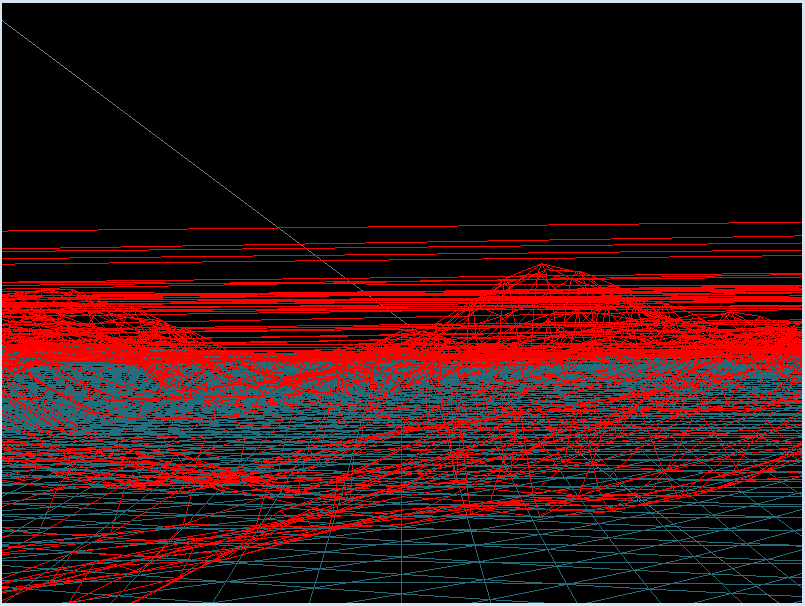
This image is a wire frame of one of my early versions of the Fault Algorithm. One downside of the fault Algorithm is that it creates very jagged, rough edges and peaks. This can be softened through a few ways. One, the fault can be a sin or cos wave instead of a straight edge. A second way is through terrain smoothing. The third way is a combination of the two. I decided to focus solely on terrain smoothing since it sounded the most interesting and could be applied to any and all terrain generation techniques. It Worked very well, almost too well, and I spent a while fine tuning my terrain to get it generating in the right position and with the right amount of edges.
This picture showcases the smoothing, also in wire frame mode. This was when I had my smoothing value and my fault values too low for my liking. However, it it a great contrast to the previous image, since the fault values are the same range, but smoothing has made the edges and peaks much softer and more realistic. With smoothing, the closer the value is to one, the softer the terrain will be.
After smoothing was complete and I had finished tweaking my generation values, I decided it would look best with some textures. Up until this point I had been working mostly in wire frame mode to make sure everything was generating correctly and to see exactly what effects the different values had.
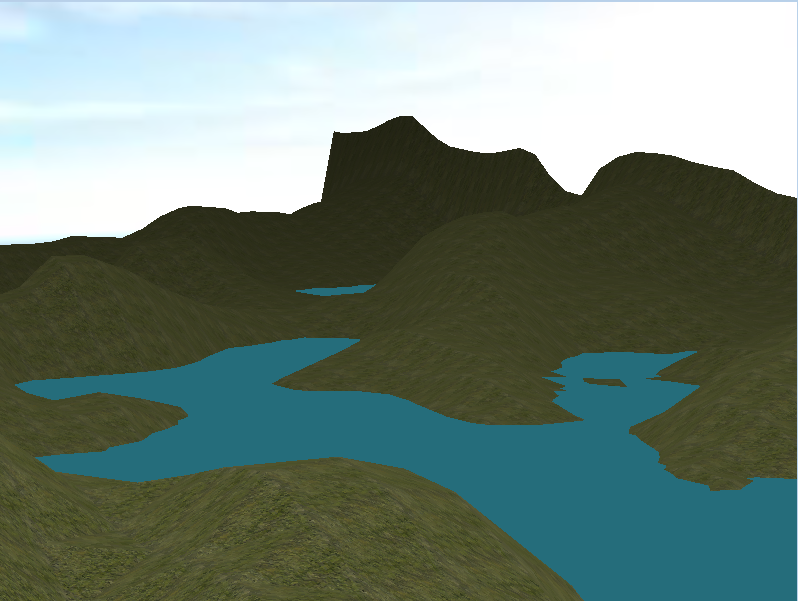


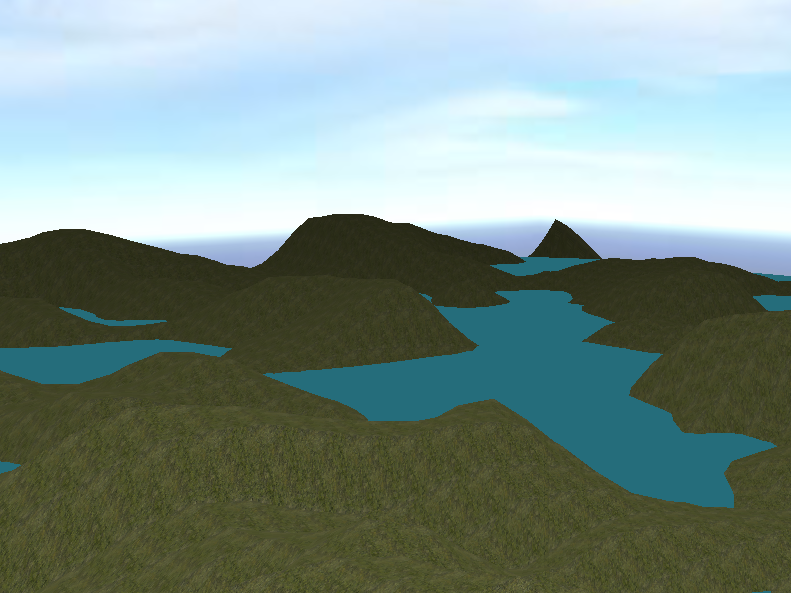


Both algorithms allow for a wide range of terrain generation and I learned a lot about both techniques as well as others. In the future I would like to expand this project to include Mid-point Displacement, Fractal Noise, and the Diamond-Square Algorithm.
I chose two techniques for my terrain generation, a Fault Algorithm and a Circle Algorithm. These are fairly simple algorithms to implement with most of the work coming down to the tuning, but if you have no background rendering 3D terrain it could be a challenge. The first Algorithm I implemented was the fault Algorithm. This one works by creating straight lines across the area of your terrain and modifying the heights on each side. On one side the height is lowered and on the other it is raised. After many iterations you can achieve a fairly realistic terrain.
This image is a wire frame of one of my early versions of the Fault Algorithm. One downside of the fault Algorithm is that it creates very jagged, rough edges and peaks. This can be softened through a few ways. One, the fault can be a sin or cos wave instead of a straight edge. A second way is through terrain smoothing. The third way is a combination of the two. I decided to focus solely on terrain smoothing since it sounded the most interesting and could be applied to any and all terrain generation techniques. It Worked very well, almost too well, and I spent a while fine tuning my terrain to get it generating in the right position and with the right amount of edges.
This picture showcases the smoothing, also in wire frame mode. This was when I had my smoothing value and my fault values too low for my liking. However, it it a great contrast to the previous image, since the fault values are the same range, but smoothing has made the edges and peaks much softer and more realistic. With smoothing, the closer the value is to one, the softer the terrain will be.
After smoothing was complete and I had finished tweaking my generation values, I decided it would look best with some textures. Up until this point I had been working mostly in wire frame mode to make sure everything was generating correctly and to see exactly what effects the different values had.
I chose a grass texture for my hills, got a nice blue coloration for the water, and my lighting is based on how far away the camera is from a part of the terrain. I thought it gave it a nice shadowed effect and gave the illusion that the world was bigger than it really is. When making and exploring my generated world, I realized how many I really liked and how awesome it would be if I could remake them, so I added seeding. The game is first loaded with a random seed, which can be saved to a text file. If you don't like the level, you can simply reload it. I included two reload options. One is a completely new seed, the other is loaded randomly from the file of saved seeds if it exists. That file can also be reloaded to include new seeds that may have been saved while going through fresh ones.
Four different worlds. Two saved, two randomly generated.
With seeding a success I turned to my last challenge, another generation algorithm. This was the Circle Algorithm. This one was a big harder to create and tune, but it is also a much gentler form of generation and doesn't require the same amount of terrain smoothing as the Fault Algorithm, if at all. It's well suited to to rolling hills compared to the Fault Algorithm's more jagged peaks that better fit a mountain range.
On Left: Fault Algorithm. On Right: Circle Algorithm
Subscribe to:
Posts (Atom)